

Where Is the Key Learning Pocket on Newer Ford SUVs? (Hint: It's Not by the Steering Column)
May 14th 2026
If you've been staring at the steering column of a newer Ford SUV trying to locate the key learning pocket, you're not alone — and you're not losing your mind. Ford moved it. On newer platforms, the learning pocket is no longer near the push-to-start button or the ignition area. It's inside the center console storage bin. Here's everything you need to know to find it fast and get the programming job done right.
What Is a Key Learning Pocket?
Before we get into location specifics, a quick refresher: the key learning pocket — sometimes called the backup slot or inductive key slot — is a physical location in the vehicle where a proximity key fob must be placed during certain programming procedures. When your key programmer instructs you to "place the key in the learning pocket," it's telling you to put the fob at a specific antenna location so the vehicle can detect and communicate with it during the add-a-key or all-keys-lost process.
On older Ford vehicles, this pocket was almost universally located near the steering column or the push-to-start button — intuitive, logical, and right in front of you. On newer models, that's no longer the case.
Where Ford Moved the Learning Pocket on Newer SUVs and Trucks
On newer Ford SUVs and trucks, the learning pocket is located inside the center console storage bin — specifically down in the tray area near the USB ports.
Open the center console lid and look down into the lower tray section. You're looking for a small recessed rectangular slot — just big enough to drop a fob into. On many trims, it sits right alongside the USB-C and USB-A charging ports. On equipped vehicles, it may be near the Pro Trailer Backup Assist knob as well.
The circuit board for the pocket reader antenna is built directly into that console area. That's why placing the fob anywhere near the steering column won't work on these platforms — the antenna simply isn't there anymore.
Which Ford Models Have the Console-Mounted Learning Pocket?
This center console layout is found on the following newer Ford models:
- Ford Explorer (2020 and newer)
- Ford Expedition (2022 and newer)
- Ford Bronco (2021 and newer)
- Ford F-150 (2021 and newer, on certain trims)
Exact placement within the console tray can vary slightly by trim level, especially on vehicles equipped with wireless charging pads, but the pocket will always be in that center console area — not at the column.
Step-by-Step: How to Find the Learning Pocket
If you're on a job and having trouble locating it, follow these steps:
- Open the center console lid and look down into the storage bin.
- Check the lower tray area, near the USB-C and USB-A ports.
- Look for a small rubber or plastic insert that appears sized for a key fob. It's a distinct, defined slot — not just a flat surface.
- If you see a rubber mat in the tray, lift it. Some trim levels have a mat covering the tray area. The learning pocket is underneath.
- Drop the fob in and proceed with your programming tool's instructions as normal.
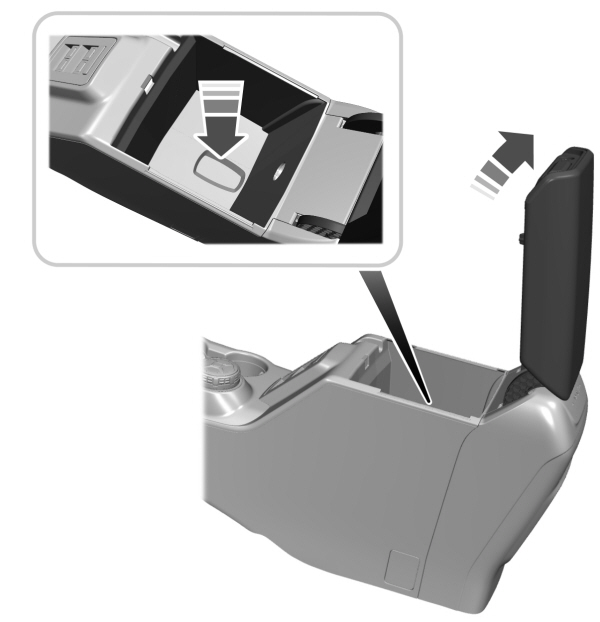
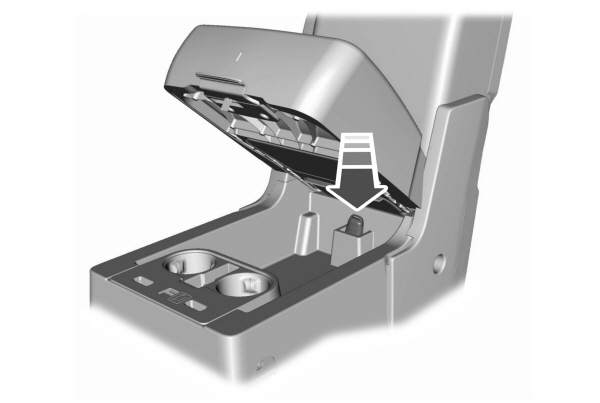
That's it. No special tool needed to access it — it's just sitting there in the console bin, waiting to be found.
Why This Causes Programming Failures
Here's where locksmiths run into real trouble: your programming tool doesn't know where you're holding the key. When the software says "place key in learning pocket," it's up to you to be in the right location.
If you're holding the fob near the steering column or the push-to-start button — which is a completely reasonable assumption based on experience with older Ford vehicles — the vehicle will not detect it. The antenna is not there on these newer platforms. The programming sequence will stall or time out, and it can be genuinely confusing because the tool may not give you a clear error message explaining why detection failed.
Moving the fob to the center console and repeating the step is almost always all it takes to resolve it.
Quick Reference: Ford Learning Pocket Location by Generation
| Vehicle | Learning Pocket Location |
|---|---|
| Older Ford models (pre-2020) | Near steering column / push-to-start area |
| Ford Explorer 2020+ | Center console bin, near USB ports |
| Ford Expedition 2022+ | Center console bin, near USB ports |
| Ford Bronco 2021+ | Center console bin, near USB ports |
| Ford F-150 2021+ (select trims) | Center console bin, near USB ports |
FAQs
My tool says "key not detected in pocket" — what do I do? Move the fob to the center console bin. If you're on a 2020+ Explorer, 2021+ Bronco, 2021+ F-150, or 2022+ Expedition and the key isn't being detected, the learning pocket is in the center console tray — not near the column.
What does the learning pocket look like? A small recessed slot in the console tray, near the USB ports. The exposed circuit board of the pocket reader may be visible on some trims; on others, a plastic or rubber cover will be in place. Either way, the slot is clearly sized for a key fob.
Is this the same on all trim levels? The pocket is always in the center console area on these platforms, but its exact position within the tray can shift slightly between trims — especially when wireless charging is present. If it's not immediately obvious, lift any rubber mats in the tray.
I'm working on a Ford model not listed here. Where do I check? Start at the center console on any newer Ford SUV or truck. If it's not there, fall back to the steering column area for older models. When in doubt, contact tech support.
Final Word
The shift from column-mounted to console-mounted learning pockets is one of those platform changes that isn't always well-documented in the field, and it catches experienced locksmiths off guard. Now that you know where to look, it's a five-second find. Open the console, locate the slot near the USB ports, drop the fob in, and keep moving.
Need help on a model not covered here? Contact Locksmith Pro Tech Support and we'll point you in the right direction.